
Blog

Form Flipping Animation with HTML, CSS, and JavaScript
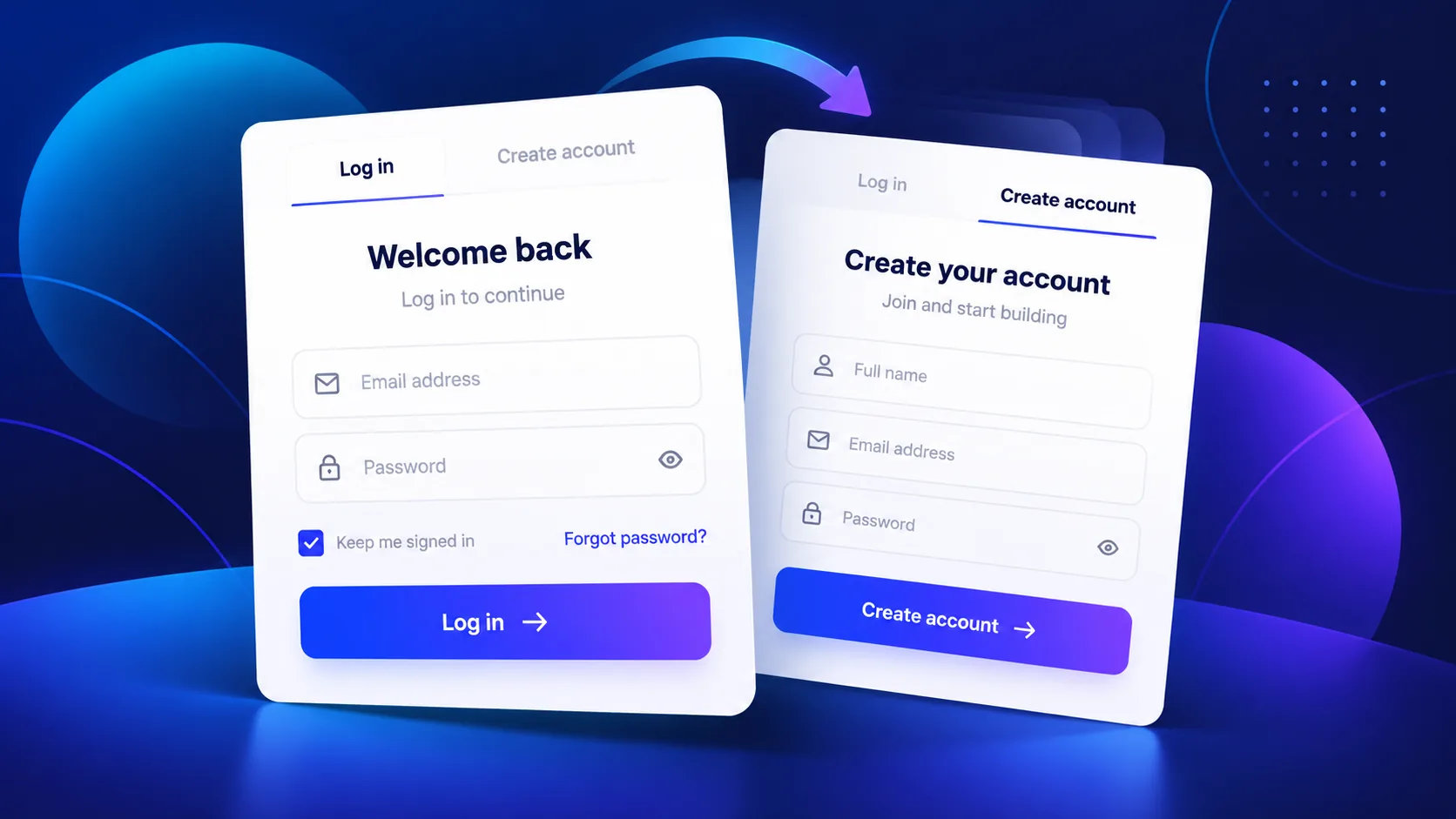
Create a responsive login and sign-up form that switches between panels with a smooth animated indicator. This tutorial uses semantic HTML, CSS transitions, and a small JavaScript tab controller. The example is a front-end interface only: it does not authenticate users or create accounts.
What you will build
The component contains two panels, Log in and Create account. Selecting a tab updates the visible panel and moves the underline. The controls support pointer input and keyboard arrow keys, and the layout adapts to narrow screens. CSS handles the visual transition; JavaScript keeps the selected tab and panel in sync.
See the form flipping animation
Use the interactive demo below to switch between the two form panels. The demo prevents submission and displays a local message; it does not send or save the values you type.
How the animation works
Each tab is a button associated with a panel through aria-controls and aria-labelledby. When a tab is selected, the script updates aria-selected, moves keyboard focus correctly, and shows the matching panel. CSS animates the indicator with transform, which is generally smoother than animating layout properties.
For a usable form, every input needs a visible label connected through matching for and id values. Autocomplete attributes help browsers identify email and password fields. The example also respects the visitor’s reduced-motion preference.
Implementation overview
The downloadable project separates the markup into index.html, styles into styles.css, and tab behavior into script.js. Add the HTML to your page, load the stylesheet, and include the script after the component markup. The complete snippets are shown in the code sections below.
Welcome back
Enter your details to continue.
Create your account
It takes less than a minute.
Demo only: the form does not send or store information.
<!doctype html>
<html lang="en">
<head>
  <meta charset="utf-8">
  <meta name="viewport" content="width=device-width, initial-scale=1">
  <meta name="color-scheme" content="light">
  <title>Animated Login and Sign-Up Form Demo</title>
  <link rel="stylesheet" href="styles.css">
</head>
<body>
  <main class="auth-demo" aria-labelledby="demo-title">
    <p class="eyebrow">HTML · CSS · JavaScript</p>
    <h1 id="demo-title">A form that flips between login and sign up</h1>
    <p class="intro">Choose a tab to see the animated form transition.</p>

    <div class="auth-card" data-auth-card>
      <div class="tabs" role="tablist" aria-label="Account access">
        <button class="tab is-active" id="login-tab" role="tab" aria-selected="true" aria-controls="login-panel" tabindex="0">Log in</button>
        <button class="tab" id="signup-tab" role="tab" aria-selected="false" aria-controls="signup-panel" tabindex="-1">Create account</button>
        <span class="tab-indicator" aria-hidden="true"></span>
      </div>

      <section class="form-panel is-active" id="login-panel" role="tabpanel" aria-labelledby="login-tab">
        <h2>Welcome back</h2>
        <p>Enter your details to continue.</p>
        <form data-demo-form>
          <label for="login-email">Email address</label>
          <input id="login-email" name="email" type="email" autocomplete="email" placeholder="you@example.com" required>
          <label for="login-password">Password</label>
          <input id="login-password" name="password" type="password" autocomplete="current-password" placeholder="Your password" required>
          <button class="submit-button" type="submit">Log in</button>
        </form>
      </section>

      <section class="form-panel" id="signup-panel" role="tabpanel" aria-labelledby="signup-tab" hidden>
        <h2>Create your account</h2>
        <p>It takes less than a minute.</p>
        <form data-demo-form>
          <label for="signup-name">Name</label>
          <input id="signup-name" name="name" autocomplete="name" placeholder="Your name" required>
          <label for="signup-email">Email address</label>
          <input id="signup-email" name="email" type="email" autocomplete="email" placeholder="you@example.com" required>
          <label for="signup-password">Create a password</label>
          <input id="signup-password" name="password" type="password" autocomplete="new-password" minlength="8" placeholder="At least 8 characters" required>
          <button class="submit-button" type="submit">Create account</button>
        </form>
      </section>
      <p class="demo-notice" role="status" aria-live="polite">Demo only: forms do not send or store information.</p>
    </div>
  </main>
  <script src="script.js"></script>
</body>
</html>* { box-sizing: border-box; }
:root {
font-family: Inter, ui-sans-serif, system-ui, -apple-system, "Segoe UI", sans-serif;
color: #17233f;
background: #f3f6fc;
font-synthesis: none;
}
body { min-width: 320px; min-height: 100vh; margin: 0; display: grid; place-items: center; padding: 32px 18px; }
.auth-demo { width: min(100%, 620px); text-align: center; }
.eyebrow { margin: 0 0 10px; color: #526ee8; font-size: .76rem; font-weight: 800; letter-spacing: .14em; text-transform: uppercase; }
h1 { max-width: 560px; margin: 0 auto 10px; font-size: clamp(1.7rem, 5vw, 2.55rem); line-height: 1.12; letter-spacing: -.04em; }
.intro { margin: 0 auto 26px; color: #62708b; line-height: 1.6; }
.auth-card { width: min(100%, 430px); margin: auto; padding: 26px; overflow: hidden; border: 1px solid #e1e7f2; border-radius: 22px; background: #fff; box-shadow: 0 24px 70px rgb(30 48 91 / 13%); text-align: left; }
.tabs { position: relative; display: grid; grid-template-columns: 1fr 1fr; margin-bottom: 28px; border-bottom: 1px solid #e8edf5; }
.tab { position: relative; z-index: 1; padding: 12px 6px 14px; border: 0; background: transparent; color: #67748e; font: inherit; font-weight: 750; cursor: pointer; }
.tab:focus-visible, .submit-button:focus-visible, input:focus-visible { outline: 3px solid #93a7ff; outline-offset: 3px; }
.tab.is-active { color: #405be0; }
.tab-indicator { position: absolute; bottom: -2px; left: 0; width: 50%; height: 3px; border-radius: 3px; background: #526ee8; transition: transform 260ms cubic-bezier(.2,.8,.2,1); }
.auth-card.is-signup .tab-indicator { transform: translateX(100%); }
.form-panel { animation: arrive 280ms ease both; }
.form-panel h2 { margin: 0 0 5px; font-size: 1.35rem; }
.form-panel p { margin: 0 0 20px; color: #75819a; font-size: .93rem; }
.form-panel form { display: grid; gap: 10px; }
label { margin-top: 4px; font-size: .88rem; font-weight: 700; }
input { width: 100%; min-height: 46px; padding: 11px 13px; border: 1px solid #dbe2ee; border-radius: 10px; background: #fbfcff; color: inherit; font: inherit; }
input::placeholder { color: #9aa5b9; }
.submit-button { min-height: 48px; margin-top: 10px; border: 0; border-radius: 10px; background: #526ee8; color: #fff; font: inherit; font-weight: 800; cursor: pointer; transition: background 160ms ease, transform 160ms ease; }
.submit-button:hover { transform: translateY(-1px); background: #405bd0; }
.demo-notice { margin: 18px 0 0; color: #74809a; font-size: .78rem; line-height: 1.5; text-align: center; }
@keyframes arrive { from { opacity: .35; transform: translateY(7px) rotateX(-5deg); } to { opacity: 1; transform: translateY(0) rotateX(0); } }
@media (max-width: 420px) { .auth-card { padding: 21px 17px; border-radius: 17px; } }
@media (prefers-reduced-motion: reduce) { *, *::before, *::after { scroll-behavior: auto !important; animation-duration: .01ms !important; animation-iteration-count: 1 !important; transition-duration: .01ms !important; } }(() => {
const card = document.querySelector("[data-auth-card]");
if (!card) return;
const tabs = [...card.querySelectorAll('[role="tab"]')];
const panels = [...card.querySelectorAll('[role="tabpanel"]')];
const notice = card.querySelector('[role="status"]');
function activateTab(selectedTab, moveFocus = false) {
tabs.forEach((tab) => {
const isSelected = tab === selectedTab;
tab.setAttribute("aria-selected", String(isSelected));
tab.tabIndex = isSelected ? 0 : -1;
});
panels.forEach((panel) => {
panel.hidden = panel.id !== selectedTab.getAttribute("aria-controls");
});
card.classList.toggle("is-signup", selectedTab.id === "signup-tab");
if (moveFocus) selectedTab.focus();
}
tabs.forEach((tab, index) => {
tab.addEventListener("click", () => activateTab(tab));
tab.addEventListener("keydown", (event) => {
if (!["ArrowLeft", "ArrowRight"].includes(event.key)) return;
event.preventDefault();
const direction = event.key === "ArrowRight" ? 1 : -1;
const nextTab = tabs[(index + direction + tabs.length) % tabs.length];
activateTab(nextTab, true);
});
});
card.querySelectorAll("[data-demo-form]").forEach((form) => {
form.addEventListener("submit", (event) => {
event.preventDefault();
if (notice) notice.textContent = "This is a visual demo. No information was sent or saved.";
});
});
})();Customize the animation
- Change the accent colors in
styles.cssto match your project. - Adjust the duration in the
.tab-indicatortransition to change the movement speed. - Add or remove form fields while keeping input IDs unique and labels connected.
- Keep the reduced-motion rule and visible keyboard focus styles when adapting the design.
Set up the files
- Download the ZIP file and extract
index.html,styles.css, andscript.js. - Open the HTML file directly in a browser to try the standalone example.
- For a website, add the markup to your page, load the stylesheet, and include the JavaScript after the component.
- Check the tab buttons with a keyboard and test the layout at phone width.
Common issues
The tabs do not switch
Check that the tab button IDs match the aria-controls values and that each value points to an existing panel ID. Confirm the script runs after the form markup.
The panel animation is missing
Verify that styles.css is linked correctly and that the browser has not blocked it. Inspect site-wide styles for rules that override the component.
The form reloads the page
The demonstration script calls preventDefault() for its forms. If you connect the form to a real service, replace this demo handler with your production submission flow.
Accessibility and security
Use real buttons for the tabs, keep the selected state updated, and preserve keyboard arrow-key support and visible focus. Honor reduced-motion preferences. Every field should have a clear label and suitable autocomplete value.
This animation is only a front-end interface. It cannot verify a user or protect credentials. For a real login or registration flow, send data over HTTPS to a trusted server-side authentication system, validate it on the server, and never store plaintext passwords.
Frequently asked questions
Can CSS alone switch between these forms?
CSS can animate the visual change. This example also uses JavaScript to synchronize the selected tab, keyboard behavior, and visible panel.
Does the demo create an account?
No. Submitting either form only displays a local demo message. It does not send, store, or authenticate any information.
Can I use the animation on my website?
Yes. You can adapt the interface for a project, but connect real account functionality to a secure backend before collecting credentials.
Summary
This form flipping animation combines accessible HTML, responsive CSS, and a small JavaScript controller. Try both panels in the live demo, then use the download button to get the complete source files.