

Blog
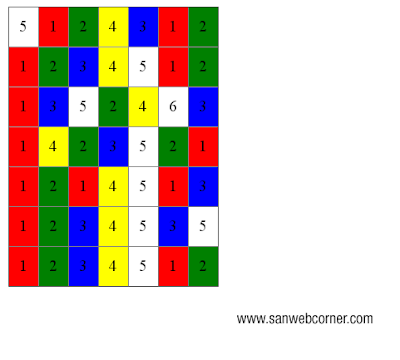

This post helps you to set the styles for table td based on the values of the cell. Here i given the background colors based on the values of the cell, you can write any style based on your requirement. This will done by using jquery.
<html>
<head>
<title>change Icon color and background color based on select box using jquery </title>
<script src=”http://ajax.googleapis.com/ajax/libs/jquery/2.0.0/jquery.min.js”></script>
<style>
table tr td
{
padding:10px;
}
</style>
</head>
<body>
<table id=”mytable” border=”1″ style=”border-collapse:collapse;”>
<tbody>
<tr>
<td>5</td>
<td>1</td>
<td>2</td>
<td>4</td>
<td>3</td>
<td>1</td>
<td>2</td>
</tr>
<tr>
<td>1</td>
<td>2</td>
<td>3</td>
<td>4</td>
<td>5</td>
<td>1</td>
<td>2</td>
</tr>
<tr>
<td>1</td>
<td>3</td>
<td>5</td>
<td>2</td>
<td>4</td>
<td>6</td>
<td>3</td>
</tr>
<tr>
<td>1</td>
<td>4</td>
<td>2</td>
<td>3</td>
<td>5</td>
<td>2</td>
<td>1</td>
</tr>
<tr>
<td>1</td>
<td>2</td>
<td>1</td>
<td>4</td>
<td>5</td>
<td>1</td>
<td>3</td>
</tr>
<tr>
<td>1</td>
<td>2</td>
<td>3</td>
<td>4</td>
<td>5</td>
<td>3</td>
<td>5</td>
</tr>
<tr>
<td>1</td>
<td>2</td>
<td>3</td>
<td>4</td>
<td>5</td>
<td>1</td>
<td>2</td>
</tr>
</tbody>
</table>
<script>
$(‘#mytable tr td’).each(function(){
var cellValue = $(this).html();
if(!isNaN(parseFloat(cellValue))) {
if (cellValue == 1) {
$(this).css(‘background-color’,’red’);
}
if(cellValue==2){
$(this).css(‘background-color’,’green’);
}
if(cellValue==3){
$(this).css(‘background-color’,’blue’);
}
if(cellValue==4){
$(this).css(‘background-color’,’yellow’);
}
}
});
</script>
</body>
</html>
This type of concept will useful for some of the applications. This is also look like sudoku game.The
below code shows you how it works. Here i will provide the demo, check it out this demo page

<html>
<head>
<title>change Icon color and background color based on select box using jquery </title>
<script src=”http://ajax.googleapis.com/ajax/libs/jquery/2.0.0/jquery.min.js”></script>
<style>
table tr td
{
padding:10px;
}
</style>
</head>
<body>
<table id=”mytable” border=”1″ style=”border-collapse:collapse;”>
<tbody>
<tr>
<td>5</td>
<td>1</td>
<td>2</td>
<td>4</td>
<td>3</td>
<td>1</td>
<td>2</td>
</tr>
<tr>
<td>1</td>
<td>2</td>
<td>3</td>
<td>4</td>
<td>5</td>
<td>1</td>
<td>2</td>
</tr>
<tr>
<td>1</td>
<td>3</td>
<td>5</td>
<td>2</td>
<td>4</td>
<td>6</td>
<td>3</td>
</tr>
<tr>
<td>1</td>
<td>4</td>
<td>2</td>
<td>3</td>
<td>5</td>
<td>2</td>
<td>1</td>
</tr>
<tr>
<td>1</td>
<td>2</td>
<td>1</td>
<td>4</td>
<td>5</td>
<td>1</td>
<td>3</td>
</tr>
<tr>
<td>1</td>
<td>2</td>
<td>3</td>
<td>4</td>
<td>5</td>
<td>3</td>
<td>5</td>
</tr>
<tr>
<td>1</td>
<td>2</td>
<td>3</td>
<td>4</td>
<td>5</td>
<td>1</td>
<td>2</td>
</tr>
</tbody>
</table>
<script>
$(‘#mytable tr td’).each(function(){
var cellValue = $(this).html();
if(!isNaN(parseFloat(cellValue))) {
if (cellValue == 1) {
$(this).css(‘background-color’,’red’);
}
if(cellValue==2){
$(this).css(‘background-color’,’green’);
}
if(cellValue==3){
$(this).css(‘background-color’,’blue’);
}
if(cellValue==4){
$(this).css(‘background-color’,’yellow’);
}
}
});
</script>
</body>
</html>