

Blog
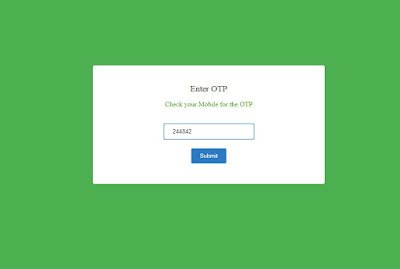

First you should purchase sms gateway various types sms service providers available through the world. you will purchase from the serveice providers, they will share you api key and sender id using that only you can able to send the sms to the mobile number. Here i am used smsgatewayhub service provider.

Now you will create database in backend and then create two different table one is otp_expiry table it is used to store the randomly generated otp in the database to use for login and another one table is registered_users, it will used to store the mobile number in database i already stored the mobile number manually you can store this mobile number using signup form.
Step1: Create Database
Create database in your backend, Here i am using database name is ” test”
Step2: Create table with this name “otp_expiry”
create table name here i am using otp_expiry to store and alter the otp, Use below sql code to create the table.
CREATE TABLE `otp_expiry` (
`otp` varchar(10) NOT NULL,
`is_expired` int(11) NOT NULL,
`create_at` datetime NOT NULL,
`id` int(12) NOT NULL,
`newid` int(12) NOT NULL AUTO_INCREMENT,
PRIMARY KEY (newid)
) ENGINE=InnoDB DEFAULT CHARSET=latin1;
Step3: Create table with this name “registered_users”
Create table name here i am using registered_users to store the registered user mobile number here i directly inserted some mobile number in database , you may include the data using registration form, Use the below sql code to create registration user
CREATE TABLE `registered_users` (
`id` int(11) NOT NULL,
`mobile` varchar(255) NOT NULL
) ENGINE=InnoDB DEFAULT CHARSET=latin1;
Below is the full opt login system code is available you can download this from by clicking the download button there i also included the database file. I already used this code in my project it works 100% . You can download and use this code to your project, you need to modify the code. you just replace your api key and sender id then the url when you purchase the sms gateway to the same service provider or you can use the php integration part from some other service providers.
OTP Full form code:
$success = “”;
$error_message = “”;
$conn = mysqli_connect(“localhost”,”root”,””,”test”);
if(!empty($_POST[“submit_email”])) {
$result = mysqli_query($conn,”SELECT * FROM registered_users WHERE mobile='” . $_POST[“mobile”] . “‘”);
$count = mysqli_num_rows($result);
if($count>0) {
// generate OTP
$otp = rand(100000,999999);
// Send OTP
$apikey = “YOUR API KEY“;
$apisender = “SENDER ID“;
$msg =”Your OTP for Login $otp”;
$num = $_POST[“mobile”]; // MULTIPLE NUMBER VARIABLE PUT HERE…!
$ms = rawurlencode($msg); //This for encode your message content
$url = ‘https://www.smsgatewayhub.com/api/mt/SendSMS?APIKey=’.$apikey.’&senderid=’.$apisender.’&channel=2&DCS=0&flashsms=0&number=’.$num.’&text=’.$ms.’&route=1′;
$mail_status=1;
//echo $url;
$ch=curl_init($url);
curl_setopt($ch, CURLOPT_SSL_VERIFYPEER, false);
curl_setopt($ch,CURLOPT_POST,1);
curl_setopt($ch,CURLOPT_POSTFIELDS,””);
curl_setopt($ch, CURLOPT_RETURNTRANSFER,2);
$data = curl_exec($ch);
echo ‘<br/><br/>’;
/* result of API call*/
if($mail_status == 1) {
$result = mysqli_query($conn,”INSERT INTO otp_expiry(otp,is_expired,create_at) VALUES (‘” . $otp . “‘, 0, ‘” . date(“Y-m-d H:i:s”). “‘)”);
$current_id = mysqli_insert_id($conn);
if(!empty($current_id)) {
$success=1;
}
}
} else {
$error_message = “Mobile not exists!”;
}
}
if(!empty($_POST[“submit_otp”])) {
$result = mysqli_query($conn,”SELECT * FROM otp_expiry WHERE otp='” . $_POST[“otp”] . “‘ AND is_expired!=1 AND NOW() <= DATE_ADD(create_at, INTERVAL 24 HOUR)”);
$count = mysqli_num_rows($result);
if(!empty($count)) {
$result = mysqli_query($conn,”UPDATE otp_expiry SET is_expired = 1 WHERE otp = ‘” . $_POST[“otp”] . “‘”);
$success = 2;
} else {
$success =1;
$error_message = “Invalid OTP!”;
}
}
?>
<html>
<head>
<title>User Login</title>
<style>
body{
background-color: #4CAF50;
}
.sanloginpanel {
border: #ffffff 1px solid;
background: #ffffff;
border-radius: 4px;
max-width: 480px;
padding: 42px 30px 46px;
text-align: center;
margin: 150px auto;
}
.tableheader { font-size: 20px; }
.tablerow { padding:20px; }
.error_message {
color: #b12d2d;
background: #ffb5b5;
border: #c76969 1px solid;
}
.message {
width: 100%;
max-width: 300px;
padding: 10px 30px;
border-radius: 4px;
margin-bottom: 5px;
}
.login-input {
border: #4caf50 1px solid;
padding: 10px 20px;
border-radius:4px;
}
.btnSubmit {
padding: 10px 20px;
background: #2c7ac5;
border: #d1e8ff 1px solid;
color: #FFF;
border-radius:4px;
}
</style>
</head>
<body>
<?php
if(!empty($error_message)) {
?>
<div class=”message error_message”><?php echo $error_message; ?></div>
<?php
}
?>
<form name=”frmUser” method=”post” action=””>
<div class=”sanloginpanel”>
<?php
if($success == 1) { ?>
<div class=”tableheader”>Enter OTP</div>
<p style=”color:#31ab00;”>Check your Mobile for the OTP</p>
<div class=”tablerow”>
<input type=”text” name=”otp” placeholder=”One Time Password” class=”login-input” required>
</div>
<div class=”tableheader”><input type=”submit” name=”submit_otp” value=”Submit” class=”btnSubmit”></div>
<?php
} else if ($success == 2) {
$result = mysqli_query($conn,”SELECT * FROM otp_expiry WHERE otp='” . $_POST[“otp”] . “‘”);
$count=mysqli_num_rows($result);
$row=mysqli_fetch_array($result);
if($count > 0){
session_start();
$_SESSION[‘newid’]=$row[‘newid’];
header(‘Location: securepage.php’);
}
?>
<?php
}
else {
?>
<div class=”tableheader”>Enter Your Mobile Number to Login</div>
<div class=”tablerow”><input type=”text” name=”mobile” placeholder=”Enter Mobile Number” class=”login-input” required></div>
<div class=”tableheader”><input type=”submit” name=”submit_email” value=”Submit” class=”btnSubmit”></div>
<?php
}
?>
</div>
</form>
</body>
</html>
Screenshots:


