

Blog
Create Simple and perfect Responsive table using css3 and jquery

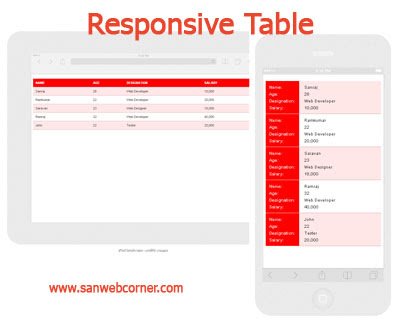

The above Example is one of the best responsive table because it shows the table in different format in responsive view.If you enter n number of records also it shows perfectly when responsive. You can change the css code according to the your website.
Html
<table id=”table”>
<thead>
<tr>
<th>Name</th>
<th>Age</th>
<th>Designation</th>
<th>Salary</th>
</tr>
</thead>
<tbody>
<tr>
<td>Sanraj</td>
<td>28</td>
<td>Web Developer</td>
<td>10,000</td>
</tr>
<tr>
<td>Ramkumar</td>
<td>22</td>
<td>Web Developer</td>
<td>20,000</td>
</tr>
<tr>
<td>Saravan</td>
<td>23</td>
<td>Web Designer</td>
<td>18,000</td>
</tr>
<tr>
<td>Ramraj</td>
<td>32</td>
<td>Web Developer</td>
<td>40,000</td>
</tr>
<tr>
<td>John</td>
<td>22</td>
<td>Tester</td>
<td>20,000</td>
</tr>
</tbody>
</table>
</div>
</body>
</html>
Css:
.bt-wrapper.active {
margin-top: 1.5em;
}
.bt-wrapper.active table {
margin: 0;
}
table {
width: 100%;
}
.table {
margin: 30px 0;
border-collapse: collapse;
border-spacing: 0;
empty-cells: show;
border: 1px solid #e0e0e0;
}
.table caption {
color: #333;
font-style: italic;
font-size: 85%;
line-height: 1;
padding: 1em 0;
text-align: center;
}
.table td,
.table th {
border-left: 1px solid #e0e0e0;
border-width: 0 0 0 1px;
font-size: inherit;
margin: 0;
overflow: visible;
padding: 0.5em 1em;
font-weight: normal;
}
.table td:first-child,
.table th:first-child {
border-left-width: 0;
}
.table thead,
.table tfoot {
background-color: #f05050;
color: #fff;
text-align: left;
vertical-align: bottom;
}
.table thead td,
.table tfoot td,
.table thead th,
.table tfoot th {
border-color: #fff;
}
.table td {
background-color: transparent;
}
.table_striped tr:nth-child(2n-1) td {
background-color: #ececec;
}
.table_bordered td {
border-bottom: 1px solid #e0e0e0;
}
.table_bordered tbody > tr:last-child > td,
.table_bordered thead > tr:last-child > td {
border-bottom-width: 0;
}
.table_horizontal td,
.table_horizontal th {
border-width: 0 0 1px 0;
border-bottom: 1px solid #e0e0e0;
}
.table_horizontal tbody > tr:last-child > td,
.table_horizontal thead > tr:last-child > td {
border-bottom-width: 0;
}