

Blog
Change the title on hover the image using javascript

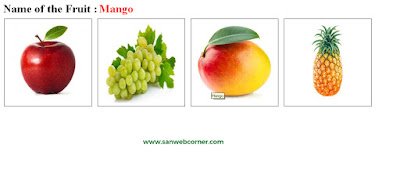
The below images is shows you the concept of the post and also visit the demo page to view live result of this code. I hope this example is help you some where in webpages or web applications.

Code for change the text on hover the image
<head>
<script type=”text/javascript”>
function setTitle(field)
{
element = document.getElementById(“titlespace”);
element.textContent = field.title;
}
</script>
<style>
img{
width:225px;
height:225px;
padding:10px;
border:1px solid #000;
margin:6px;
}
</style>
</head>
<body>
<table>
<tr>
<td colspan=”3″style=”color:black; font-size:2em; font-weight:bold;”>Name of the Fruit : </td>
<td colspan=”3″ id=”titlespace” style=”color:red; font-size:2em; font-weight:bold;”> </td>
</tr>
</table>
<img src=”img/apple.jpg” title=”Apple” onmouseover=”setTitle(this);” />
<img src=”img/grapes.jpg” title=”Grapes” onmouseover=”setTitle(this);” />
<img src=”img/mango.jpg” title=”Mango” onmouseover=”setTitle(this);” />
<img src=”img/pineapple.jpg” title=”Pineapple” onmouseover=”setTitle(this);” />
</body>
</html>