

Hi all, Going to see how to create responsive table using pure css. This method very easy to understand. This table simple created using html and css. This table insert Name,Phone number, Idno, Jobposition.Below see the coding demo video available going to see download the code.
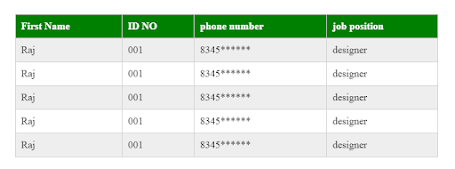
Code:
<table>
<thead>
<tr>
<th>First Name</th>
<th>ID NO</th>
<th>phone number</th>
<th>job position</th>
</tr>
</thead>
<tbody>
<tr>
<td data-column=”First Name”>Raj</td>
<td data-column=”idno”>001</td>
<td data-column=”phone”>8345******</td>
<td data-column=”job”>designer</td>
</tr>
<tr>
<td data-column=”First Name”>Raj</td>
<td data-column=”idno”>001</td>
<td data-column=”phone”>8345******</td>
<td data-column=”job”>designer</td>
</tr>
<tr>
<td data-column=”First Name”>Raj</td>
<td data-column=”idno”>001</td>
<td data-column=”phone”>8345******</td>
<td data-column=”job”>designer</td>
</tr>
<tr>
<td data-column=”First Name”>Raj</td>
<td data-column=”idno”>001</td>
<td data-column=”phone”>8345******</td>
<td data-column=”job”>designer</td>
</tr>
<tr>
<td data-column=”First Name”>Raj</td>
<td data-column=”idno”>001</td>
<td data-column=”phone”>8345******</td>
<td data-column=”job”>designer</td>
</tr>
</tbody>
</table>
Css:
table {
width: 750px;
border-collapse: collapse;
margin:50px auto;
}
tr:nth-of-type(odd) {
background: #eee;
}
th {
background:green;
color: white;
font-weight: bold;
}
td, th {
padding: 10px;
border: 1px solid #ccc;
text-align: left;
font-size: 18px;
}
@media
only screen and (max-width: 760px),
(min-device-width: 768px) and (max-device-width: 1024px) {
table {
width: 100%;
}
table, thead, tbody, th, td, tr {
display: block;
}
thead tr {
position: absolute;
top: -9999px;
left: -9999px;
}
tr { border: 1px solid #ccc; }
td {
/* Behave like a “row” */
border: none;
border-bottom: 1px solid #eee;
position: relative;
padding-left: 50%;
}
td:before {
position: absolute;
top: 6px;
left: 6px;
width: 45%;
padding-right: 10px;
white-space: nowrap;
content: attr(data-column);
color: #000;
font-weight: bold;
}
}
